Context · 5 of 20
Why Context Is Everything (and How to Give It)
Claude only knows what you tell it, so the quality of your output tracks the quality of your context, and the practical ways to supply it.
There is one idea that sits underneath everything else in this guide: Claude only knows what you tell it. It has no access to your live deal, your firm’s house view, or the document open on your other screen unless you put that material in front of it. The quality of what you get back tracks, almost exactly, the quality of the context you give. Master that and the rest is technique.
Claude starts with a blank page
When you open a new chat, Claude knows nothing about your work. It has broad general knowledge, but it cannot see your Project Atlas data room, it does not know which sector you are screening, and it has no idea what “the usual format” means to you. Every useful answer begins with you supplying the facts and the framing.
This is liberating once you internalize it. You are not hoping Claude guesses what you meant; you are deciding what it should know. A vague question forces Claude to invent the missing context, and invented context is where confident, fluent, wrong answers come from. A well briefed question gives Claude solid ground to stand on.
The core loop
Good work with Claude is not a single perfect prompt. It is a short, repeatable loop that you run until the output is right. Four moves, in order, again and again.
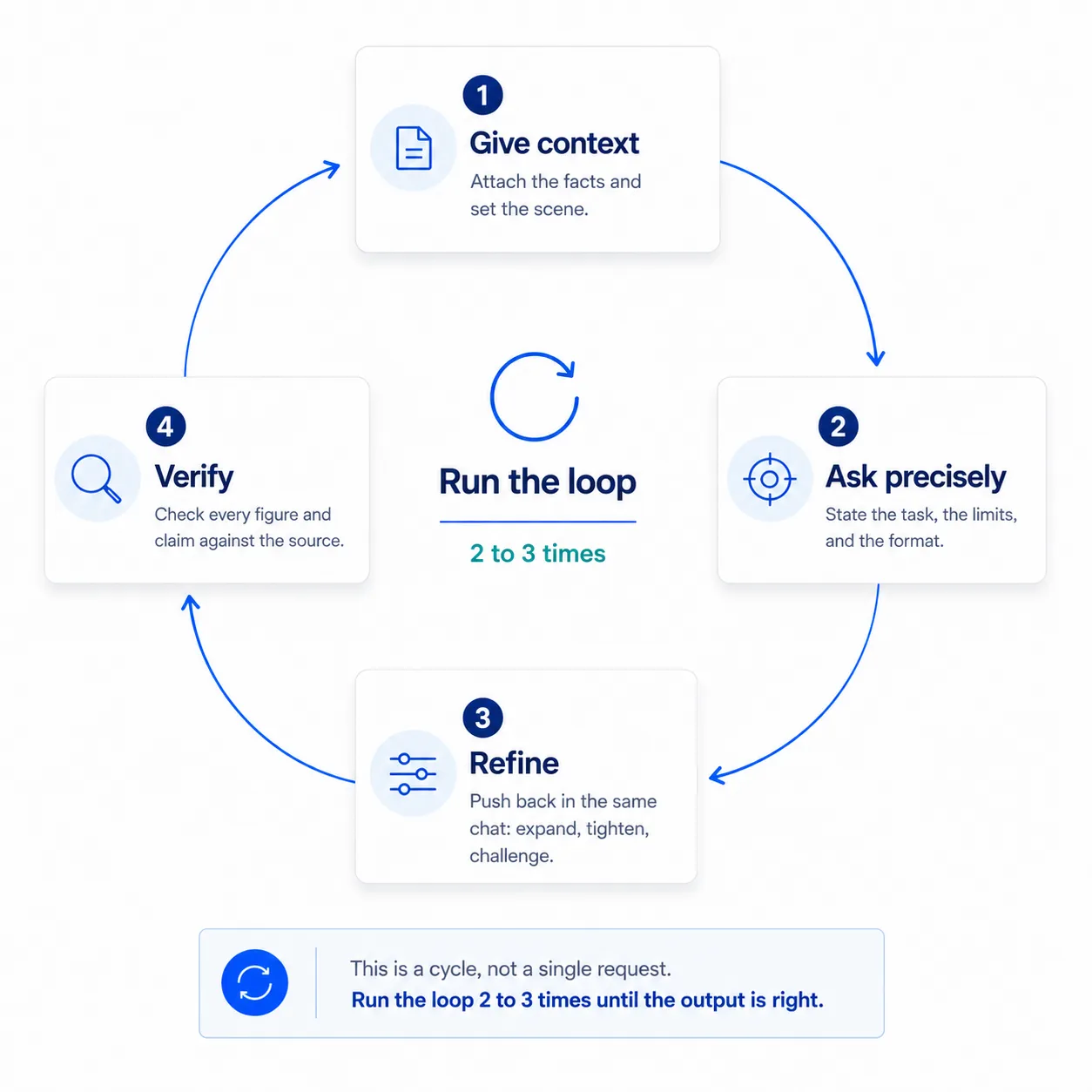
- Give context. Attach the document, paste the figures, or state the situation. Tell Claude who it is helping and what it is working on.
- Ask precisely. State the task, the constraints, and the format you want. Precision in equals precision out.
- Refine. Read the first answer and push back in the same chat: expand a section, tighten the tone, challenge an assumption. The second turn is usually where the value appears.
- Verify. Check every figure, name, and claim against the source before any of it reaches a deliverable. Fluent prose is not the same as correct prose.
Most people stop after the first answer. The professionals run the loop two or three times, and the difference shows in the output.
Context-free versus well briefed
The same underlying question produces wildly different answers depending on how much context comes with it. Compare these two openers on an identical document.
What do you think of this company?
Claude has no role, no task shape, no sense of what “good” looks like, and no idea what you will do with the answer. It will produce something generic and probably hedge in every direction.
You are assisting a private equity associate screening Project Atlas, a mid-market field-service software target. I have attached the teaser.
Assess it on three dimensions, in this order:
- Business quality (revenue model, growth, margins)
- The investment angle (why this could be attractive to a buyer)
- The three biggest risks or open questions
Use short bullet points. Cite the page or figure for any number you quote, and flag anything the teaser is vague about.
The second prompt sets a role, names the target, defines the task, fixes the format, and tells Claude to flag gaps. Same document, far more useful answer.
What context buys you
| With thin context | With rich context |
|---|---|
| Generic, hedged commentary | A focused view aimed at your actual decision |
| Claude guesses the format | Output arrives in the shape you can use |
| Invented detail fills the gaps | Claude flags gaps instead of inventing |
| You rewrite most of it | You refine the edges, not the whole thing |
The right column is what a few extra sentences of context produces.
Context is cumulative within a chat
Once you have briefed Claude in a conversation, that context stays live. You do not re-attach the file or restate the situation on every turn. You simply keep going: “Now put the financials in a table,” or “Rewrite the overview for a partner with thirty seconds.” Each message builds on everything said so far, which is why refining is cheap and why a single well briefed chat compounds in value the longer you work in it.
The flip side matters too: because context accumulates, a chat that has drifted across three unrelated tasks becomes muddled ground for the fourth. Keep one chat to one job. The What Not to Do page returns to this.
How to supply context
If context is everything, the next question is purely practical: how do you actually get your material in front of Claude? There are three routes, and most PE work uses the first two every day. The sections below walk through each and when to reach for it.
Attach, paste, or connect
| Method | When to use it | Strengths | Watch-outs |
|---|---|---|---|
| Attach a file | A teaser, CIM, model, or deck already saved on your machine | Reads whole documents (PDF, Word, Excel) in full; the everyday default | Wait for the file to finish attaching before you send |
| Paste text directly | A few paragraphs, an email, a table, or notes with no file | Fast; no upload step; good for snippets | Long pastes get unwieldy; a file is cleaner past a page |
| Connect a live source | A large or frequently updated library (for example Google Drive) | Pulls live, large sources without re-uploading | Must be enabled by IT |
Most PE work lives in the first two rows. Connectors are an optional accelerator your IT team enables.
Attach a file
Attaching is the workhorse. Claude reads the entire document, so a sixty-page CIM or a multi-tab Excel model is no problem. Click the plus button in the message box, choose Upload from computer, wait for the file to finish attaching, then ask your question. You can attach several files to one message, which is how you ask a single question across a whole set of documents.
Paste text directly
Sometimes there is no file, just a chunk of text: a paragraph from an email, a short table, a few lines of management commentary. Paste it straight into the message box and tell Claude what to do with it. This is quicker than saving a file first, and it is ideal when the context is small. Past roughly a page, an attached file reads more cleanly and is easier to reference later.
Connect a live source
Connectors let Claude reach an external system, such as a shared drive, without you downloading and re-uploading files by hand. They shine when the source is large or changes often. One thing to know up front: a connector has to be switched on by your IT or workspace administrator before it appears. Connectors are an accelerator, not a requirement; the Connectors page covers them in full.
Asking across several documents
The real power of attaching is the cross-document question. Give Claude two or three files at once and ask it to reconcile, compare, or find the gaps between them.
You are assisting a private equity associate on Project Atlas. I have attached the teaser and the financial model.
Compare the two and tell me:
- Where the model’s growth and margin assumptions line up with the teaser’s narrative
- Where they diverge, with the figure and the source for each side
- The questions these differences raise for management
Use a short table for the comparison. If a number appears in one file but not the other, say so rather than estimating it.
That single prompt does work that would otherwise mean flipping between two documents line by line, and it tells Claude to flag mismatches instead of papering over them.
The takeaway
Claude is a fast, capable partner, but it is only ever as good as the context you give it and only as trustworthy as your verification. Hold those two ends, rich context going in and disciplined checking coming out, and the loop in between does the work. In practice you will attach files most of the time, lean on multi-file questions to do cross-document work, and reach for connectors only once IT has switched them on. With the context supplied, the next lever is how you phrase the request itself, covered in Writing Effective Instructions. If you want to revisit how to shape the ask itself, see Anatomy of a Good Prompt.