Projects · 9 of 20
Reusable vs Deal Projects
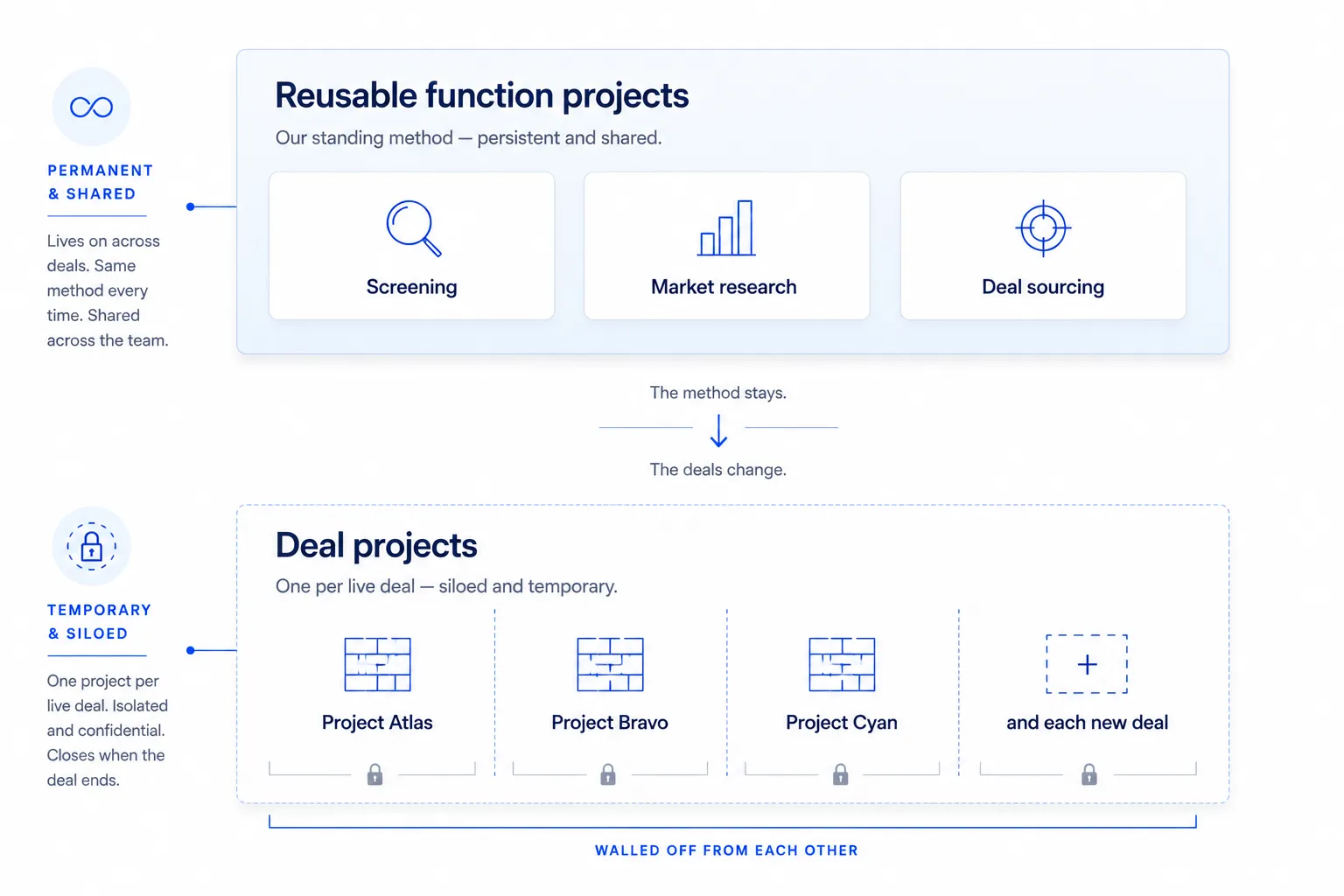
The two-layer project system: reusable function projects that persist, and one-time deal projects that stay siloed and are archived on close.
Your screening method never changes; the opportunities running through it change constantly. That single distinction is the most important idea in how you organize work in Claude. Once it clicks, every decision about where a file goes and where a chat belongs becomes obvious. The principle is simple: you run two layers of Projects, and they have very different lifespans and purposes.
The two layers
Layer one: reusable function projects
A reusable function project is built around a task you do repeatedly, not around any single opportunity. It holds your methodology: the way your team approaches that task, the frameworks you apply, and the output templates you expect.
You build one of these once and use it across every opportunity. Typical examples:
- A Screening project that holds your screening checklist, your investment committee criteria, and a sample memo structure, so every initial screen comes out in the same shape.
- A Market Research project that holds your standard research framework and the format you like findings delivered in.
These projects contain no confidential deal data. They contain how you work. That is precisely why they can persist and be shared: there is nothing opportunity-specific to protect.
The output templates are the most valuable thing in this layer, and the part most often left half-built. A checklist copied out of a Word document is a start, but a real template names the inputs it needs, interviews you for the ones you left out, and writes its constraints down instead of trusting you to remember them. From Prompt to Template sets out that structure and includes four full templates from live engagements, plus a blank master prompt, that you can lift straight into a reusable project.
Layer two: one-time deal projects
A deal project is built around one live opportunity. You create exactly one per opportunity, and it holds that opportunity’s data room: the CIM, the financials, the management deck, the diligence materials. It is siloed by design, so its contents never mingle with another opportunity’s. When the opportunity closes, completes, or dies, you archive or delete the project.
The mental model: function projects are your toolkit (permanent, shared, generic). Deal projects are your active workbenches (temporary, siloed, specific). You bring the toolkit’s thinking to each workbench.
How the two layers work together
In practice you use both at once. When a new opportunity (say, Project Atlas) arrives:
- You stand up a fresh deal project for Atlas and load its data room.
- You lean on your Screening function project to remember how to screen: the checklist, the criteria, the memo shape.
- You apply that methodology to Atlas’s materials inside the Atlas project.
The function project supplies the method. The deal project supplies the facts. Keeping them apart is what lets the method be reused freely while the facts stay locked down. Both of these Project layers sit beneath your account-level Instructions for Claude, which carry your standing preferences into every conversation regardless of which Project you are in.
Reusable vs deal projects at a glance
The two layers compared
| Reusable function project | One-time deal project | |
|---|---|---|
| Lifespan | Permanent: lives across many opportunities | Temporary: created for one opportunity, archived on close |
| What it holds | Methodology, frameworks, checklists, output templates | One opportunity’s data room (CIM, financials, diligence) |
| Who shares it | Shared across the team as a standing toolkit | Limited to those working that specific opportunity |
| Confidentiality | Low: contains no opportunity-specific data | High: siloed by design, never mixed with other opportunities |
Function projects persist and are shared. Deal projects are siloed and temporary.
A common mistake to avoid
The tempting shortcut is to make one giant “Private Equity” project and throw everything into it: your templates, plus three live opportunities, plus old reference material. Do not do this. It collapses both layers into one and destroys the silo. Claude would then be able to pull a figure from one opportunity into a conversation about another, which is exactly what the two-layer system is designed to prevent.
The reusable layer still needs maintenance
A function project is permanent. The templates inside it are not. Every template was written against whichever model was current at the time, and models keep getting better. When a new one arrives, a template tuned to its predecessor quietly starts working against it: scaffolding that used to be necessary becomes redundant, worked examples that used to steer the answer start narrowing it, and instructions written to prevent a failure mode now guard against something that no longer happens.
This rarely breaks loudly. The output still arrives, still in the right shape, just a little flatter and more literal than the model was capable of. That is why it goes unnoticed for months.
So build a habit: whenever the model behind Claude changes, take your reusable templates back through it. The fastest way to do that is to ask Claude to do it for you.
Below is a prompt template my team wrote for [model it was written for]. We are now running on [current model].
Review it against what the newer model can do and tell me:
- Which instructions are now redundant scaffolding the model no longer needs
- Which constraints still earn their place and should stay untouched
- Where the template is now under-specified, because the model can handle more than it used to be asked for
Then give me a revised version, followed by a short list of what you changed and why. Do not change the output format unless you explain what it buys me.
[paste the template here]
Then verify rather than assume. Run the old and the revised version against the same input once, compare the two outputs side by side, and keep whichever is genuinely better; a suggestion from Claude about its own prompting is still a suggestion. Save the winner back into the function project with the date and the model it was tuned for written at the top, so the next person can see how current it is at a glance.
Where to go next
With the model clear, the next two pages are the practical build guides. Start with the reusable layer, then the deal layer:
- Setting Up a Reusable Project: build a Screening project you will use on every target.
- Setting Up a Deal Project: stand up a siloed project for one live opportunity.